
How Smartcat, Phrase, and MemoQ-Compatible DTP Files Improve Global Publishing

Publishing Delays Often Begin with Incompatible Source Files

Many multilingual publishing projects experience delays before translation even starts. Documents that are not prepared for translation management systems often require manual text extraction, repeated formatting corrections, and additional desktop publishing work after translation. These extra production steps can increase costs, extend project timelines, and make version control more difficult.

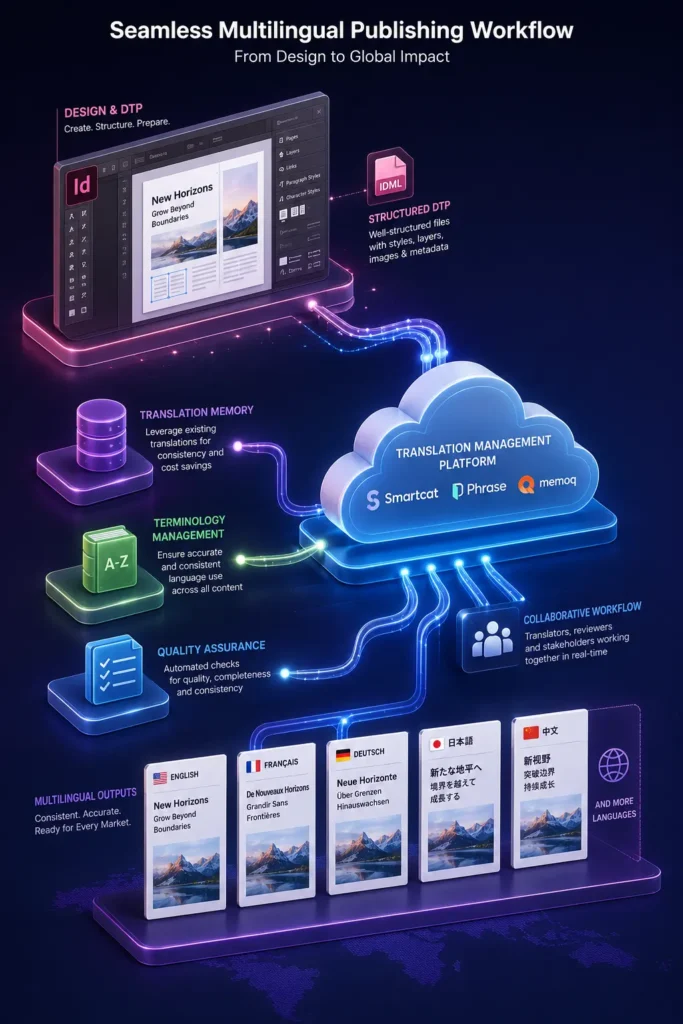
Preparing Adobe InDesign and other desktop publishing files to be compatible with platforms such as Smartcat, Phrase, and MemoQ helps create a more efficient publishing workflow. Structured DTP files enable smoother content exchange, preserve document formatting, and improve collaboration between design, translation, and production teams.

Smartcat DTP files
Why Translation-Compatible DTP Files Matter

Translation management platforms perform best when they receive well-structured source files. Organized layouts, consistent styles, and properly managed assets allow content to move through the localization workflow with fewer manual interventions.

Translation-compatible DTP files help organizations:

  • Preserve document structure
  • Reduce formatting corrections
  • Improve production consistency
  • Simplify multilingual updates
  • Support efficient quality reviews

A structured publishing workflow minimizes production challenges while maintaining document quality across multiple language editions.

How Smartcat, Phrase, and MemoQ Fit into Publishing Workflows

Modern translation management platforms provide tools that improve collaboration and translation consistency. When paired with properly prepared DTP files, they support efficient document processing from content extraction through final publication.

These platforms commonly support:

  • Translation Memory integration
  • Terminology management
  • Collaborative translation workflows
  • Quality assurance checks
  • Version tracking
  • Review and approval processes

When DTP files are prepared correctly, content can move more efficiently between publishing and translation environments.

Smartcat DTP files
Characteristics of Translation-Compatible DTP Files

Well-prepared desktop publishing files make localization workflows more reliable and easier to manage.

Important characteristics include:

  • Consistent paragraph and character styles
  • Organized document layers
  • Editable text elements
  • Linked graphics and assets
  • Standardized templates
  • Clean document structure
  • Properly managed fonts and tables

These practices reduce production effort and simplify future document updates.

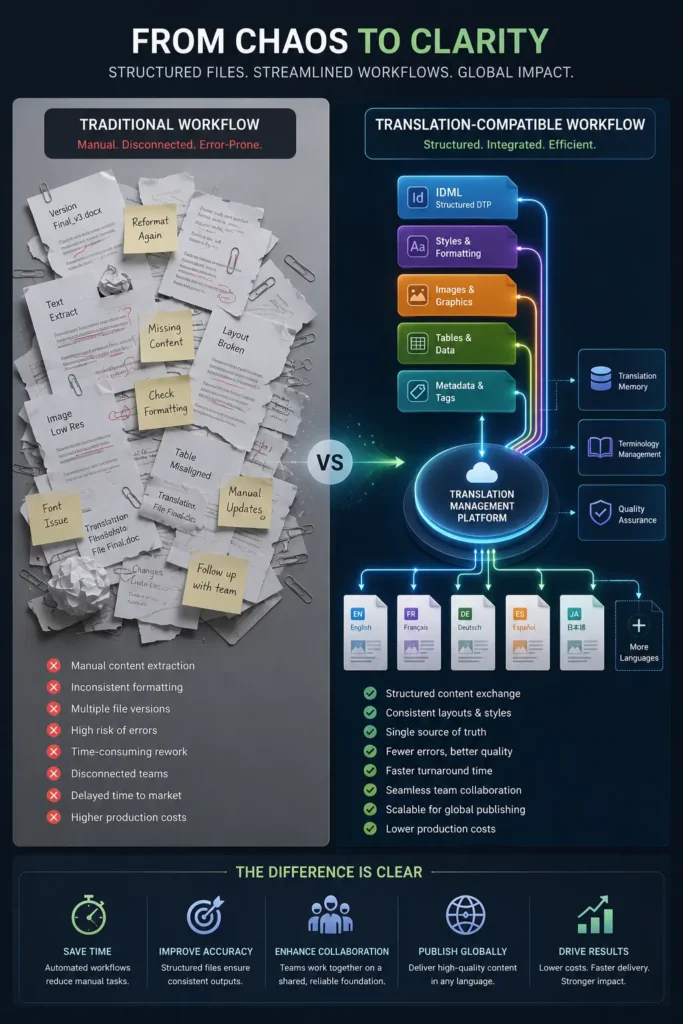
Traditional Workflow vs. Compatible DTP Workflow

Traditional Publishing Workflow

Translation-Compatible Workflow

Manual content extraction

Structured content exchange

Frequent formatting corrections

Better layout preservation

Multiple revision cycles

Streamlined production reviews

Separate production activities

Integrated publishing workflow

Longer delivery schedules

Improved production efficiency

Structured DTP files help reduce unnecessary manual work while improving consistency throughout multilingual publishing projects.

Improving Collaboration Across Teams

Publishing projects often involve designers, translators, editors, reviewers, and production specialists. Translation-compatible DTP files create a shared foundation that allows each team to work more efficiently without repeatedly rebuilding document layouts.

Benefits include:

  • Better coordination between departments
  • Faster document reviews
  • Reduced production rework
  • More consistent formatting
  • Improved version management

A standardized workflow also simplifies future revisions and content updates.

Smartcat DTP files
A Practical Publishing Scenario

A software company regularly publishes user manuals, installation guides, and technical documentation for international customers. The design team prepares structured desktop publishing files with standardized styles, organized assets, and editable content before sending them to a translation management platform compatible with Smartcat, Phrase, or MemoQ.

Once translation is complete, the localized content returns with much of the original formatting preserved. The production team performs only minor layout refinements before final quality checks, enabling faster publication while maintaining a consistent visual identity across every language edition.

Creating More Connected Publishing Workflows

Global publishing depends on accurate translation, consistent document formatting, and efficient collaboration across multiple production teams. By preparing DTP files that are compatible with platforms such as Smartcat, Phrase, and MemoQ, organizations can streamline localization workflows, reduce manual production tasks, and maintain high-quality publications across every language edition. A structured approach to desktop publishing supports scalable, reliable, and efficient multilingual content production.

FAQ

Translation-compatible DTP files are well-structured publishing files that support efficient content exchange with translation management systems while preserving layouts and formatting.

They reduce manual formatting work, improve document consistency, and simplify collaboration throughout multilingual publishing projects.

They help manage translation memory, terminology, quality assurance, collaboration, and project workflows while integrating efficiently with properly prepared DTP files.

Technical manuals, educational materials, product catalogs, corporate reports, user guides, marketing brochures, and regulatory documentation commonly benefit from structured publishing workflows

Preparing structured desktop publishing files, applying consistent formatting standards, organizing assets, and integrating compatible translation workflows significantly reduce production effort while improving document quality.
