What Makes Adobe InDesign the Industry Standard for Typesetting?

In the world of professional publishing, your layout makes or breaks your content. Whether it is a sprawling 500-page novel, a high-end corporate brochure, or an interactive digital magazine, presentation is everything.

While basic word processors and generic design tools exist, one software reigns supreme in the publishing ecosystem: Adobe InDesign.

But what distinguishes Adobe InDesign as the undisputed industry standard for typesetting and page layout? Let’s look into why top designers, publishers, and agencies won’t use anything else.

Adobe InDesign the Industry Standard for Typesetting

Unmatched Typographic Control

At the heart of typesetting is the meticulous arrangement of text. InDesign doesn’t just let you type; it gives you microscopic control over every letter, word, and paragraph.

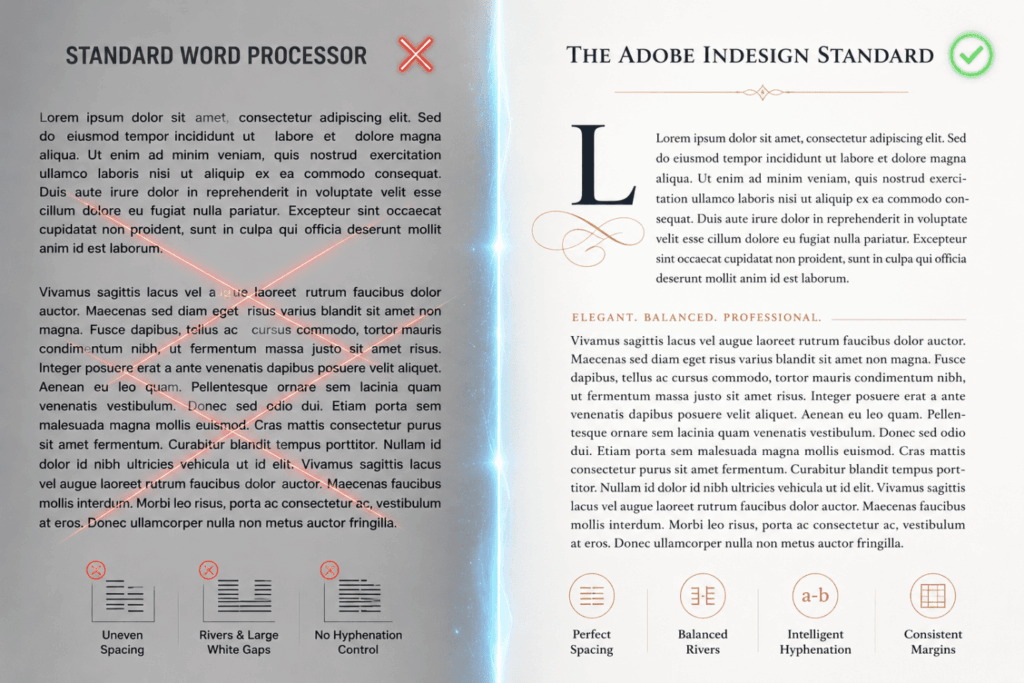
  • The Adobe Paragraph Composer: InDesign optimizes word spacing and hyphenation by analyzing a complete paragraph, unlike basic software that assesses text per line. This removes unsightly gaps and produces a visually balanced block of text.
  • Precise Kerning, Tracking, and Leading: Designers can adjust the spacing between specific letter pairs (kerning), blocks of text (tracking), and vertical lines (leading) down to fractions of a point.
  • OpenType Feature Support: InDesign unlocks the full power of professional fonts, allowing seamless integration of ligatures, fractions, swashes, and true small caps.
Adobe InDesign the Industry Standard for Typesetting

Scalability Through Styles

Imagine formatting a 300-page book manually. If you decide to change the font size of the chapter titles, you would have to do it 20 or 30 times.

InDesign solves this with its robust Styles architecture:

  • Paragraph and Character Styles: Define a look once (font, size, color, spacing) and apply it globally with a single click.
  • Object Styles: Apply consistent formatting like borders, drop shadows, and text wrapping to graphic frames instantly.
  • Nested Styles: Automatically apply character formatting to a specific part of a paragraph (e.g., making the first three words of a paragraph bold and uppercase automatically).

This scalability guarantees absolute consistency across massive documents while slashing production time by half.

Seamless Integration with Adobe Creative Cloud

Designers rarely work in a vacuum. A typical publishing workflow involves photo editing and vector illustration. Because InDesign is part of the Adobe Creative Cloud (CC) ecosystem, it integrates flawlessly with Photoshop and Illustrator.

The Power of Smart Linking: Instead of embedding heavy image files, InDesign “links” to them. If you update an illustration in Illustrator, it automatically updates inside your InDesign layout. This keeps file sizes manageable and eliminates the risk of using outdated assets.

Master Pages and Parent Pages for Flawless Layouts

Consistency is the hallmark of professional typesetting. InDesign’s Parent Pages (formerly Master Pages) act as structural templates for your documents.

By placing repeating elements such as running headers, footers, page numbers, and grid guidelines on a Parent Page, they automatically appear across all assigned document pages. If you need to shift the position of a page number, you change it once on the Parent Page, and the entire document updates instantly.

Adobe InDesign the Industry Standard for Typesetting

Advanced Long-Document Management

Many design tools choke when handling files with hundreds of pages. InDesign is built to handle heavy lifting. It offers specialized features tailored for books, manuals, and academic papers:

  • Book Panels: Link separate InDesign documents together to keep track of chapters, page numbering, and cross-references without bloating a single file.
  • Automated table of contents and indexing: Automatically generate accurate, hyperlinked tables of contents and indexes that update dynamically with page changes
  • Footnotes and Endnotes: Effortlessly manage citations with automated placement that adjusts as text flows.

Is Adobe InDesign Right for Your Business?

If your business relies on creating high-quality print or digital media, the short answer is yes. Using non-standard tools often results in formatting errors, pixelated print jobs, and endless frustration when collaborating with professional printers. Investing in InDesign means investing in a tool that speaks the exact language of the global printing and publishing industry.

FAQ

Most frequent questions and answers

Typesetting is the specific art and process of arranging text on a page to make it readable and visually appealing (adjusting fonts, spacing, and alignment). Page layout is the broader task of arranging both text and visual elements (images, graphics, backgrounds) on a page. InDesign excels at both.

While Canva is great for quick social media graphics and Word is ideal for typing manuscripts, neither offers the precise typographic control, grid systems, or CMYK color management required for high-end, professional printing.

InDesign is highly versatile. It allows you to create interactive PDFs, eBooks (EPUB format), and digital magazines featuring clickable buttons, embedded video, hyperlinks, and responsive layouts.

InDesign provides robust “Preflight” tools that check for errors (like low-resolution images or missing fonts) before sending a file to production. It also handles color profiles (like CMYK for print) perfectly, ensuring what you see on your screen matches the final printed product.