How PDF to DOC Conversion Streamlines Translation and Localization Workflows

In the global marketplace, expanding your reach means speaking your customers’ language. For businesses looking to scale internationally, translation and localization are no longer optional they are critical growth drivers.

However, localization teams frequently hit a major roadblock before they even translate a single word: the dreaded PDF file.

While PDFs are excellent for sharing and preserving document layouts, they are notoriously difficult to edit. For translation workflows, uneditable files mean lost time, inflated budgets, and unnecessary friction. Converting PDFs into editable Word documents (DOC/DOCX) is a simple step that can completely transform your localization pipeline, accelerate your time-to-market, and significantly boost your ROI.

1. Seamless Integration with CAT Tools

Modern translation relies heavily on Computer-Assisted Translation (CAT) tools and Translation Management Systems (TMS). These platforms break text down into segments, allowing linguists to work efficiently while maintaining consistency.

  • The PDF Problem: Most CAT tools cannot parse PDFs effectively. Trying to upload a PDF often results in broken sentences, missing text blocks, or completely scrambled formatting.

The DOC Solution: Word documents are the native language of CAT tools. Converting your files to DOC format ensures that the software can seamlessly extract text, accurately count words, and present the content to translators in a clean, readable grid

PDF to DOC Conversion

2. Unlocking the Power of Translation Memories (TM)

One of the biggest cost-saving benefits of modern localization is the use of a Translation Memory (TM), a database that stores previously translated phrases and sentences. When a translator encounters a sentence that has been translated before, the TM automatically suggests the approved translation.

Why PDFs break this system: Because PDFs often introduce random line breaks and hidden formatting tags, CAT tools struggle to recognize matching text. A sentence split across two lines in a PDF won’t match a perfect phrase in your TM.

By converting files to a clean DOC format, you eliminate these formatting anomalies. This ensures maximum TM leverage, drastically reducing translation costs for repetitive content and maintaining brand consistency across all markets.

3. Preserving Layouts and Reducing Desktop Publishing (DTP) Costs

When you translate text from English into languages like German or Finnish, the text often expands by up to 30%. Conversely, translating into East Asian languages like Chinese or Japanese can compress the text significantly.

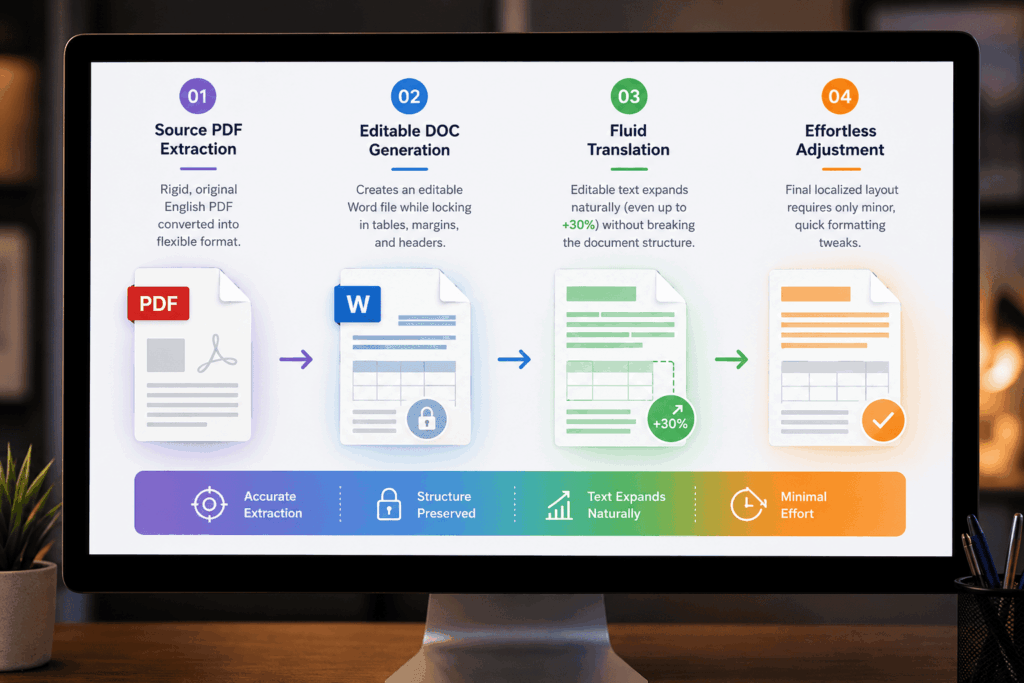
In a locked PDF, text expansion completely breaks the layout, forcing graphic designers to spend hours manually rebuilding brochures or user manuals from scratch. Converting to a DOC file changes everything through a seamless, automated progression:

  • Step 1: Source PDF Extraction – The rigid, original English PDF is accurately converted into a flexible format.
  • Step 2: Editable DOC Generation – The converter creates an editable Word file while locking in tables, margins, and headers.
  • Step 3: Fluid Translation – As the linguist translates, the editable text expands naturally (even up to +30%) without breaking the underlying document structure.
  • Step 4: Effortless Adjustment – Instead of a total layout redesign, the final localized layout requires only minor, quick formatting tweaks.

This fluid workflow slashes post-translation desktop publishing (DTP) hours and keeps your design expenses to an absolute minimum.

PDF to DOC Conversion

4. Accelerating Turnaround Times

In digital marketing and product launches, speed is everything. Delays in localization mean delayed product launches and lost revenue.

Manually copying and pasting text from a PDF into a separate document for a translator is a massive time sink and introduces a high risk of human error. Automated PDF-to-DOC conversion takes seconds, allowing your localization team to kick off projects immediately. Faster preparation leads to faster translation, ensuring you hit your global launch dates ahead of the competition.

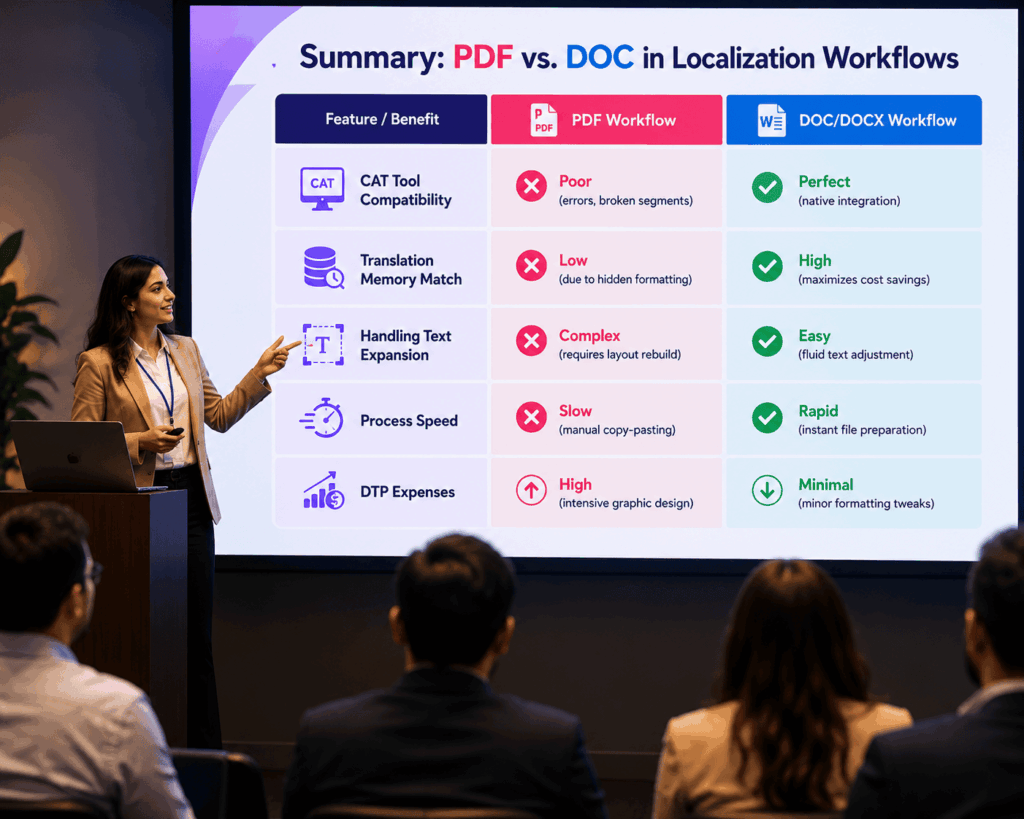
Summary: PDF vs. DOC in Localization Workflows

Feature / Benefit

PDF Workflow

DOC/DOCX Workflow

CAT Tool Compatibility

Poor (errors, broken segments)

Perfect (native integration)

Translation Memory Match

Low (due to hidden formatting)

High (maximizes cost savings)

Handling Text Expansion

Complex (requires layout rebuild)

Easy (fluid text adjustment)

Process Speed

Slow (manual copy-pasting)

Rapid (instant file preparation)

DTP Expenses

High (intensive graphic design)

Minimal (minor formatting tweaks)

Frequently Asked Questions (FAQs)

PDFs are static “snapshots” designed for viewing, not editing. Attempting to type directly into a PDF often breaks line spacing, overlaps text, and scrambles fonts. Furthermore, translators cannot link PDFs to critical productivity software like CAT tools, making the manual translation process incredibly slow and error-prone.

High-quality PDF-to-DOC converters utilize advanced formatting recognition to preserve your text alignments, tables, headers, and images. While minor adjustments may be needed after translation due to text expansion, starting with an editable DOC file is drastically faster than rebuilding a broken PDF layout from scratch.

It saves money in three major ways: it eliminates manual copy-pasting time, it allows CAT tools to accurately reuse past translations (lowering per-word translation costs), and it slashes post-translation desktop publishing (DTP) fees by keeping layout structures intact.

Yes. By using a PDF-to-DOC converter equipped with Optical Character Recognition (OCR), you can transform scanned documents or image-based text into fully searchable, editable Word documents that are ready for localization.

Streamlining Your Path to Global Success

If your business is serious about global expansion, your localization workflow needs to be as lean and efficient as possible. Relying on static, uneditable PDFs creates artificial bottlenecks that drain your budget and delay your campaigns.

Integrating a reliable PDF to DOC conversion tool into your pre-translation phase removes technical friction, empowers your linguists, and optimizes your localization spend. By turning rigid documents into flexible, CAT-friendly files, you can scale your content output, maintain pristine brand consistency, and reach international audiences faster than ever before.

Don’t let file formats hold your business back. Optimize your workflow, convert your assets, and unlock true global agility today.